Microsoft Graph has become the backbone of modern Microsoft 365 development, but how you interact with it can make a big difference in your productivity, app performance, and code maintainability. Microsoft’s official SDK for working with Graph, @microsoft/msgraph-sdk, is a TypeScript-based library that offers a consistent, fluent API surface for interacting with Microsoft Graph endpoints across services like Users, Drives, and Mail.
Recently, there was an episode on the Code.Deploy.Go Live. podcast with Julie Turner and Andrew Connell, which discussed some initial concerns with the Microsoft Graph SDK. So, I decided I would spend more time with the SDK to understand how it’s designed, how it performs in real-world usage, and what developers can expect when building modern web applications with it.
If you just want the conclusions, scroll down to Investigation: What I Found. Otherwise, let’s get hands-on.
Getting Hands-On
To get a feel for the SDK, I built a simple SharePoint Framework (SPFx) web part that fetches a list of users from Microsoft Graph. The goal was to evaluate both the developer experience and the architectural trade-offs involved.
Using @microsoft/msgraph-sdk
The Microsoft Graph SDK is an official Microsoft library for working with Microsoft Graph. It’s a fluent SDK, with rich IntelliSense and works in both browser and server side (Node) projects. The SDK separates it’s functionality into completely different NPM packages based on the separate Microsoft Graph API paths. That is, if you want to interact on Graph Users, you would need to install and import the @microsoft/msgraph-sdk-users package and if you want to interact with Drive data, you’d have to install @microsoft/msgraph-sdk-drives.
Before using any of these, there are two key dependencies that must be installed for authentication:
npm install @microsoft/kiota-authentication-azure @azure/identity
These are the authentication providers for Azure Identity and for Microsoft Entra, which are required for working with Microsoft Graph.
These providers allow developers to authenticate requests and provides classes for doing so regardless of the authentication mechanism you need. There are providers for Authorization Code flow, Client Credential flows, OBO flows, and more. It’s a pretty nice offering for all different types of authentication you need… and their usage is consistent between all of them.
Initial Configuration
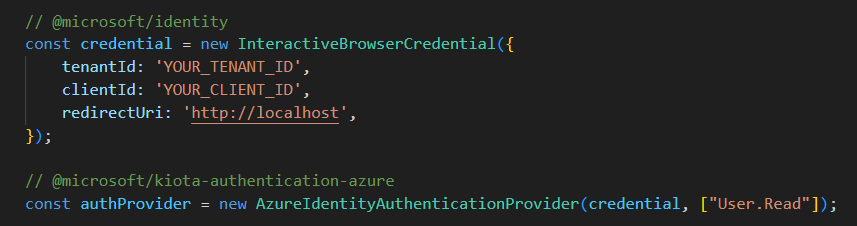
To start, I am going to import an InteractiveBrowserCredential, this is because I am building a Single Page Application.

Next, I will create instances of the InteractiveBrowserCredential and the auth provider with the scopes required for the API calls to Users.
Calling into APIs
I need to install the API package that I want to be working this. In this case, I wanted to work with Users.
npm install @microsoft/msgraph-sdk-users
Setting it up
Next I will import a client and a RequestAdapter from the core @microsoft/msgraph-sdk package and the API specific package for working with Users.

Once these have been imported, I can now create new instances of a GraphRequestAdapter and the ServiceClient using the authProvider I created earlier.

Now that this is completed, I can start working on calling the APIs using that same graphServiceClient.

And voila, I’m done. The coding experience is nice. The SDK is fluent and logical, the IntelliSense is handy for any developer.
Investigation: What I found
At first glance, the SDK provides everything you’d expect… structured setup and very good intellisense. However, after testing and examining the build output more closely, I noticed a few concerns.
Bundle Size Considerations
One of the first things that stood out during testing was the bundle size, which Julie and Andrew discussed in their podcast. Even for relatively simple Graph operations (like fetching users), the resulting bundle was noticeably larger than expected for front-end applications.

To put this into perspective, to do a /users call in PnPjs (another popular Microsoft Graph SDK), the resulting bundle size is 1/10th the size, or 262KB.

This comes down to how the Microsoft Graph SDK is architected. The Microsoft Graph SDK is built on top of Kiota, Microsoft’s code generation framework. Kiota provides:
- A core runtime (
@microsoft/kiota-http-fetch,@microsoft/kiota-abstractions, etc.) to handle request building, serialization, and response parsing. - Authentication adapters (
@microsoft/kiota-authentication-azure,@azure/identity) that integrate with Microsoft Entra and Azure Identity flows. - Generated API modules (like
@microsoft/msgraph-sdk-users), which import the full endpoint surface area.
Code generation tools come in many flavors and patterns, and many of them fall victim to the same issues… a codebase that is bloated, heavy and inflexible. That’s not to say the Microsoft Graph SDK is all of these things, in fact, Microsoft did a fantastic job making sure the SDK is opinionated where it matters, but still flexible to allow developers to build and extend it. However, if you peak into the codebase itself, you’ll start to notice a pattern…. layers upon layers of abstraction and significant amounts of duplicate code.
Each API endpoint is isolated and fully self-contained. This means each endpoint implements it’s own request builder, including it’s own query parameter mappings, error mappings, serialization logic, and full request metadata for GET/POST/{} operations.
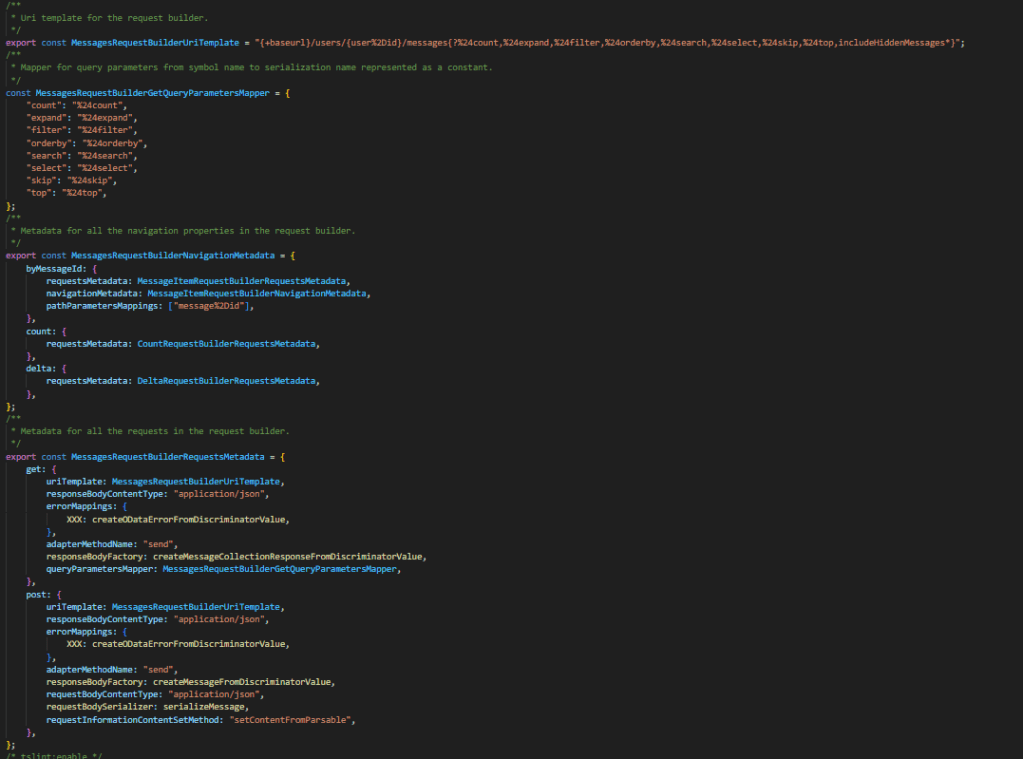
If you take a look at this code which is for the /users/{id}/messages endpoint. You have a full request builder which defines the entire endpoint. It defines what metadata exists on a request, which OData operators are supported, etc. Every endpoint will have the same exact structure, even if, for example, the same QueryParameters exist on that other endpoint. It will be duplicated.
It took me nearly 3 minutes to bundle my SPFx solution when I added the @microsoft/msgraph-sdk-users package. 🥺
This is a big reason for the large bundle sizes. The SDK is very verbose if you’re going to use it as-is, however, this can be improved. Which leads me to the next part….
A “convenience” SDK and a different approach to SDK consumption
I posted my initial thoughts of this blog into a LinkedIn post. Sebastien Levert (Microsoft Graph) replied to my post and said some things that I thought were interesting, but also initially concerning.
He stated:
Kiota supports native endpoint selection to build your own API clients. The “Graph SDK” is provided for convenience and will only bundle the packages you really need (we split them across 70+ packages). So you have this opportunity to split at the operation level, the base routes and to include all of it. I’m happy to have a deeper chat on our design choices!
That being said, I understand it’s a big shift from the previous version and we are conscious there will be a transition period. We had really good results with other languages and think this approach is much more repeatable and reduce significantly the efforts required to maintain all languages vs. having special approaches per language.
As I read this, I don’t think he disagreed with anything I stated, but he did supply some really helpful foundational information into the reasoning for the way things are built as they are. (If you’re interested in learning more Darrel Miller did a great session on this, you can watch on Youtube).
Split at the operation level
Remember when I said that each API endpoint is isolated and fully self-contained? This architecture was intentional. The way the SDK is built (separate and fully encapsulated RequestBuilders), allows Kiota to generate versions of the Microsoft SDK using only the individual endpoints you wish to use.
That is, if you find the bundle sizes too large from the 70+ npm packages Microsoft ships for convenience, you can actually create your own using Kiota and include only the endpoints you want. This will greatly reduce the overall bundle sizes of your solution.
In fact, this is the recommendation by Microsoft. The Microsoft Graph API is HUGE. While I personally believe there is a lot of overhead and duplicate code due to Kiota, a large part of the problem of shipping a feature rich SDK on Graph, is that there are just a lot of endpoints to include. In PnPjs, we solve this problem with selective imports.
If you’re looking to learn how about to use Kiota to generate your own SDK, check out Vincent Biret’s demo.
Convenience?
This leads into my final concern. Convenience. Now, I’m taking the term convenience too literally, I know this. Convenience in the original context was “it’s there if you need to use it, but the recommendation is to use Kiota”. So bare with me as I stretch this out a bit…
The point of an SDK is to make it easier for developers to build on top of something that already exists. Without an SDK, you’re left wiring everything by hand and reading raw API docs. For many developers, installing the Microsoft Graph SDK from npm just works: they can call graphClient.users.get() and move on.
But here’s the catch: If you’re not careful, you’re inflating your bundle sizes without even realizing it. Which is why the Kiota approach, splitting at the operation level, exists. You can generate your own SDK tailored to your exact needs.
It sounds great in theory… but let’s be honest, how many developers will actually go through the process of generating a custom SDK to shave off the bundle size? It’s less “install and go” and more “install, generate, configure, integrate.”
So this sort of takes away from the convenience I normally associate with using an SDK… though, it’s still easier than writing everything yourself.
Closing thoughts
I want to be clear… this blog isn’t about knocking the Microsoft Graph SDK. It’s a solid, fully-supported library, and for enterprises that need official backing or can’t use third-party or open-source tooling, it’s a reliable choice. Kiota alone, is an impressive feat of engineering that makes creating your own SDK’s from OpenAPI defined APIs much easier than writing them yourself.
Ultimately, the takeaway is this: Microsoft’s Graph SDKs are designed to cover every scenario out-of-the-box, which is convenient but comes with trade-offs. Kiota gives you tools to optimize, but at the cost of some extra setup. If bundle size and control matter, generating a custom SDK with Kiota or looking towards other open-source SDKs is the way to go.
Hopefully this post was helpful. Maybe, if anything, it gives you some things to think about before installing any package from NPM (Microsoft Graph SDK or otherwise).

 Beau Cameron